
A Mini PC under $500 can handle everyday work, streaming, and light creative tasks without taking over your desk. But a low price alone proves little. Processor generation, memory capacity, storage, cooling, and upgrade options shape the experience. A compact case can also run warm or sound louder than expected.
The market context is encouraging, though it does not guarantee better mini PCs. IDC’s Worldwide Quarterly Personal Computing Device Tracker reported that global PC shipments grew 1.0% in 2024, reaching 262.7 million units. IDC analyst Ryan Reith described the market as having “clearly stabilized.” That observation concerns PCs broadly, not mini PCs specifically. Buyers should treat it as context, not a promise of lower prices or stronger performance.
Small details matter. Check whether the advertised price includes Windows, and confirm the exact RAM and SSD configuration. Look for USB-C, dual-display support, and accessible memory slots. A machine that fits beside a monitor may still need a VESA mount, keyboard, and mouse. Those extras can push the final cost past $500. Not glamorous, but important.
This guide compares seven models using practical criteria: everyday speed, port selection, upgradeability, noise, and value. No single mini PC suits every desk. Some trade quiet operation for performance; others save money with limited memory. Expect compromises. The goal is to find the one that fits your workload, not just the smallest box with the lowest sticker price.
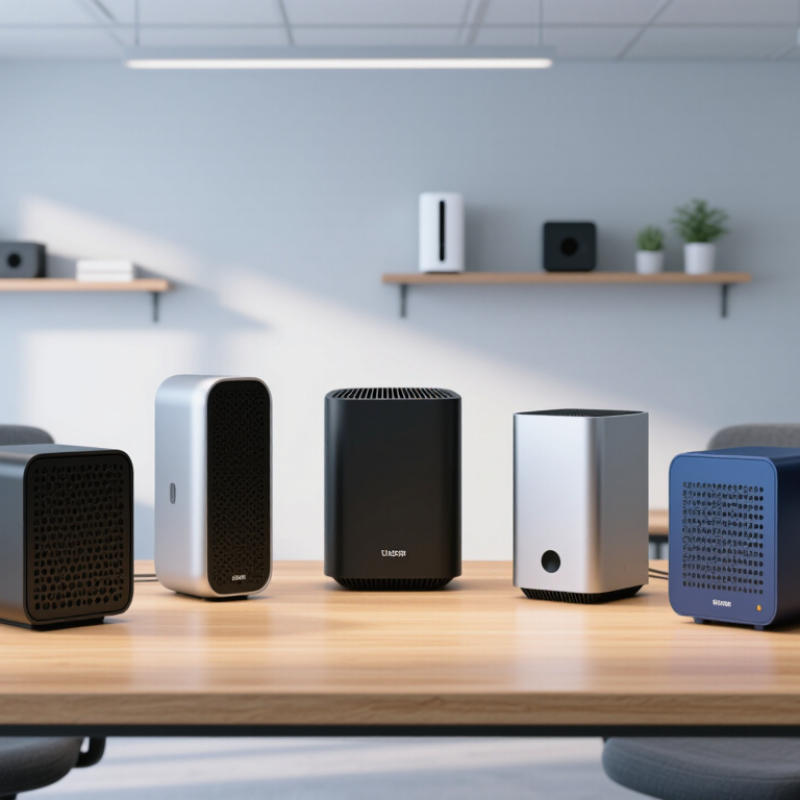
A mini PC is a compact desktop computer, usually built around low-power laptop-class components and designed to sit on a desk or behind a display. There is no single industry-wide size definition. In practice, the label describes a form factor, not a guaranteed level of performance. A palm-sized case may handle web browsing, office work, and video playback, yet struggle with sustained rendering or modern games. Check the processor class, memory, storage, ports, and cooling design—not just the case size.
The 2026 context is shaped by rising interest in AI-capable computers, but that does not make every budget mini PC an AI workstation. Gartner forecast 114 million AI PC shipments worldwide in 2025, or 43% of all PC shipments; this is a forecast, not a final sales count. For a sub-$500 system, prioritize enough memory for your workload, a replaceable or adequate solid-state drive, and ports that match your monitor and peripherals. A small fan can become audible during long tasks. That detail is easy to miss. Compare complete configurations and check independent testing before buying, because low starting prices may omit needed memory or storage.
The shortlist began with systems priced below $500, using the configuration available at the time of review. Prices and memory options can change, so a low starting price did not automatically qualify a model. Each candidate was compared for processor performance, installed memory, storage capacity, and upgrade options. We also checked whether its ports could support everyday equipment, such as a monitor, keyboard, wired network connection, and external drive.
Specifications were only part of the decision. We considered performance during common office tasks, video playback, and sustained workloads, where heat can slow a compact computer. Fan noise mattered, too. A machine that sounds distracting on a quiet desk may be a poor fit, even if its benchmark scores look strong. Small details count.
The final seven were chosen to represent different needs, including basic home use, multitasking, and compact workstation setups. We weighed value against practical limitations, rather than treating the lowest price as the best deal. No shortlist is perfect: results may vary with software, room temperature, and the exact hardware configuration. That uncertainty deserves attention. A buyer should confirm the listed memory, storage, and current price before ordering.
For a mini PC under $500, compare the processor’s sustained performance, not just its advertised boost speed. A small chassis can heat up quickly, causing performance to drop during long video calls or exports. SPEC CPU 2017 reports separate speed and throughput results, a useful reminder that single-task responsiveness and heavy multitasking are not the same thing. Check independent tests for both. IDC reported 262.7 million PC shipments worldwide in 2024, up 1.0% year over year; that broad market figure signals choice, but says little about any one machine’s quality.
Aim for 16 GB of memory if you keep many browser tabs open, and check whether it can be upgraded. A 512 GB solid-state drive gives room for apps and files, though large video libraries fill it fast. Look for Wi-Fi 6 or newer, multiple USB ports, and two display outputs if you use a desk monitor plus a TV. Fan noise matters, too. A loud unit can spoil a quiet room.
Tips: Read tests that run for at least 10–15 minutes, not only quick benchmark bursts. Check temperatures and noise alongside scores. I would still leave a little budget for a hub or extra storage; specs never tell the whole story.
| Pick | Processor Configuration | Memory & Storage | Graphics | Typical Connectivity | Estimated U.S. Price | Performance & Best Use |
|---|---|---|---|---|---|---|
| 1. Best for Basic Work | 4 cores / 4 threads; 6 W class; boost up to 3.4 GHz | 16 GB memory; 512 GB NVMe SSD | Integrated graphics; suitable for video playback and everyday display tasks | Typically HDMI, USB-A, USB-C, Gigabit Ethernet, Wi-Fi, and Bluetooth; port selection varies | $150–$220 | Entry level Good for web browsing, office applications, streaming, and light home-server tasks. Not intended for demanding games or heavy creative workloads. |
| 2. Best Low-Power Value | 4 cores / 4 threads; 6 W class; boost up to 3.6 GHz | 16 GB memory; 512 GB NVMe SSD | Integrated graphics; hardware video-decoding support depends on the processor and system configuration | Commonly includes HDMI, USB-A, USB-C, Gigabit Ethernet, Wi-Fi 6, and Bluetooth | $180–$260 | Entry level A modest step up for responsive everyday use while retaining low power consumption. Check the exact memory type and display outputs before buying. |
| 3. Best Budget Multitasker | 6 cores / 12 threads; 15 W class; boost up to 4.0 GHz | 16 GB DDR4 memory; 512 GB NVMe SSD | Integrated graphics with 7 graphics compute units | Typically HDMI, USB-A, USB-C, Gigabit Ethernet, Wi-Fi 5 or 6, and Bluetooth | $230–$330 | Mainstream More capable with multiple applications open and suitable for light photo editing. Integrated graphics are best for casual games and older titles. |
| 4. Best Efficient 6-Core Option | 6 cores / 12 threads; 15 W class; boost up to 4.2 GHz | 16 GB DDR4 memory; 512 GB NVMe SSD | Integrated graphics with 6 graphics compute units | Often includes HDMI, USB-A, USB-C, Gigabit Ethernet, Wi-Fi 6, and Bluetooth | $260–$360 | Mainstream A balanced choice for office work, programming, and everyday multitasking. Sustained performance depends on the mini PC’s cooling and power limits. |
| 5. Best for Sustained CPU Work | 6 cores / 12 threads; 45 W class; boost up to 4.2 GHz | 16 GB DDR4 memory; 512 GB NVMe SSD | Integrated graphics with 7 graphics compute units | Typically HDMI, USB-A, USB-C, Gigabit Ethernet, Wi-Fi, and Bluetooth; exact specifications vary | $300–$420 | Upper mainstream Higher power limits can help with longer CPU-heavy tasks. Expect more heat and fan noise than from low-power configurations. |
| 6. Best for CPU-Heavy Multitasking | 8 cores / 16 threads; 45 W class; boost up to 4.4 GHz | 16 GB DDR4 memory; 512 GB NVMe SSD | Integrated graphics with 8 graphics compute units | Commonly HDMI, USB-A, USB-C, Gigabit Ethernet, Wi-Fi 6, and Bluetooth | $350–$480 | High CPU performance Well suited to compiling code, heavier multitasking, and CPU-based productivity. Confirm that the cooling system can maintain performance under sustained load. |
| 7. Best Integrated Graphics | 6 cores / 12 threads; 45 W class; boost up to 4.5 GHz | 16 GB DDR5 memory; 512 GB NVMe SSD | Integrated graphics with 6 newer-generation compute units | Often HDMI, USB-A, USB-C, Gigabit Ethernet, Wi-Fi 6, and Bluetooth; display capabilities vary by ports | $400–$500 | Best graphics potential Among these configurations, the newer graphics architecture and faster memory offer the strongest potential for light gaming and graphics-accelerated tasks. |
Prices are approximate U.S. street-price ranges for commonly sold configurations, not guaranteed 2026 listings. Specifications, port selection, wireless features, cooling, and upgrade options vary by individual system. Check the seller’s current listing and confirm the exact configuration before purchase.
A useful mini PC is defined by its workload, not its size. Prices and configurations can shift during 2026, so treat these as buying profiles under $500, not fixed model listings. For web browsing, email, and video calls, a low-power four-core system with 16GB of memory is a sensible first pick. A six-core processor with 16GB suits spreadsheets and several open apps. For light photo editing, choose a stronger integrated graphics chip and fast storage; expect limits with large projects. A discounted business-class mini PC can also be a dependable office option, especially when it includes a warranty.
For a living-room media setup, prioritize quiet cooling, reliable video output, and enough storage for your files. A dual-network-port model fits a home lab or small network project. An upgradeable barebones unit can offer good value, but only if memory and storage keep the final cost below budget. That detail is easy to miss. These seven options serve different needs, so compare processor generation, ports, and return terms rather than relying on headline speed claims.
Tips: Check that memory is included, confirm the power adapter comes with the unit, and read the warranty details. If possible, choose a seller with a clear return window. A compact case can still run warm under sustained load.
A practical planning guide for choosing a budget mini PC. RAM figures are suggested targets for these workloads, not benchmark results; actual needs depend on software and workload size.
Choosing a mini PC starts with the work, not the processor label. For email, spreadsheets, and video calls, prioritize 16 GB of memory, a responsive solid-state drive, and quiet cooling. Heavy browser multitasking needs more memory. Photo editing or software development benefits from stronger sustained performance, which tiny cases may struggle to maintain under heat.
Your desk matters, too. Measure the space behind your monitor, check whether the computer supports your display resolution, and count the USB ports you actually use. A webcam, headset, external drive, and keyboard can quickly fill a small port selection. Short cables help. So does a clear plan for ventilation. A cramped shelf can make a capable system noisy.
IDC forecast that AI-capable PCs could reach 167 million shipments in 2027, nearly 60% of the PC market. That forecast is useful context, not a reason to pay extra for unused features. For local AI tasks, check the processor’s neural processing capability and memory requirements; for routine office work, spend more on memory, storage, or a better monitor. One detail is easy to miss: advertised performance may not hold during long workloads in a compact chassis. Check independent reviews for sustained-load testing, and reconsider your choice if the fan noise would bother you on a quiet call. IDC, Worldwide AI PC Forecast, 2024.
Thank you for reaching out.
Your message has been received, and a member of the Bluestem Energy Solutions team will be in touch soon. We appreciate your interest and look forward to connecting.
